Which Smart Trainer App? 2026 Comparison: WattLog.pro, Zwift, MyWhoosh, ROUVY and TrainerRoad
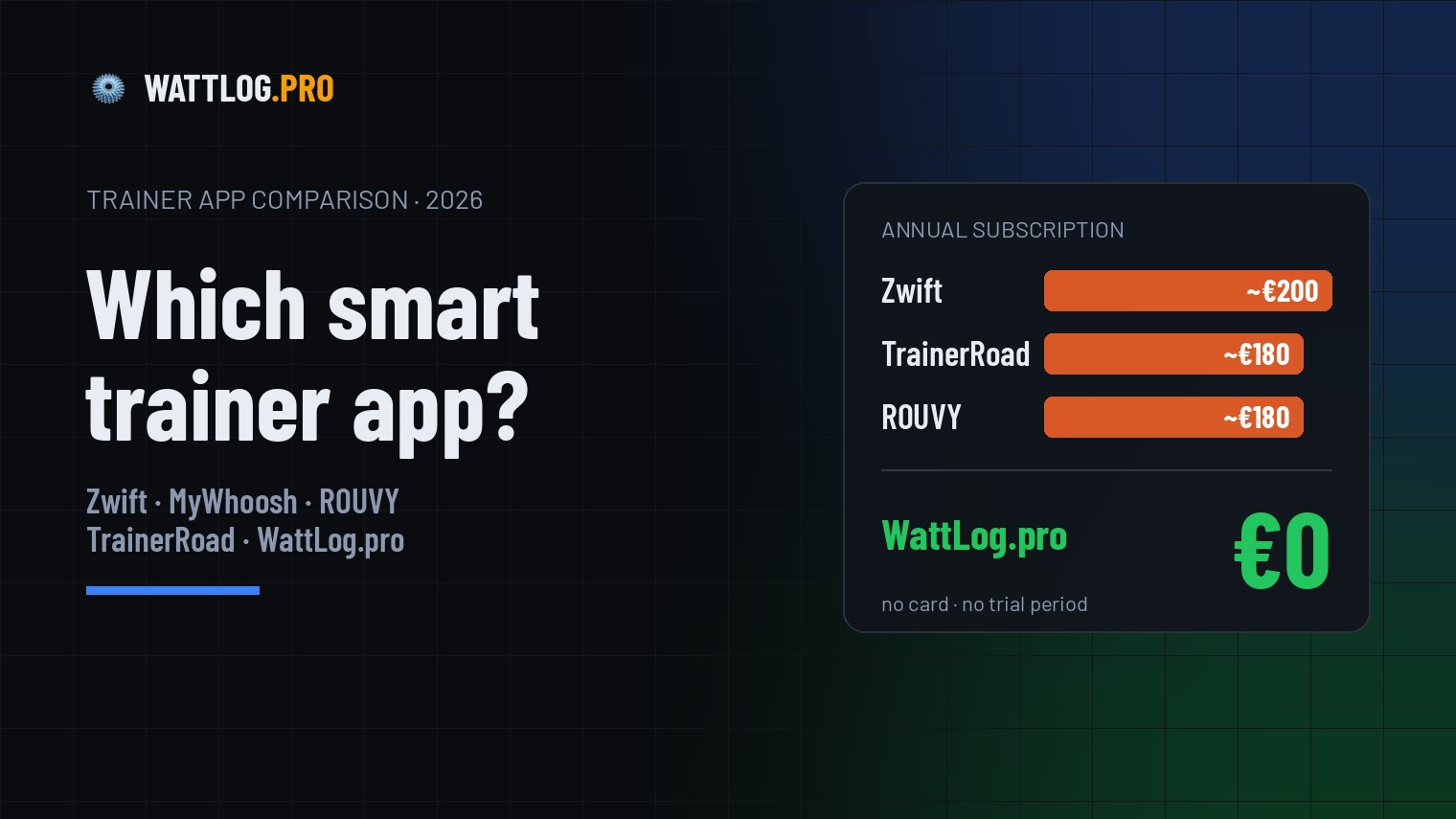
You bought a smart trainer, rolled out the mat and set up the fan. Now comes the question everyone asks at the start: which app should you install? Zwift, MyWhoosh, ROUVY, TrainerRoad and a few others do roughly the same thing: they control the trainer's resistance and record the ride. Where they differ is what they put on the screen, what they do with your data and what they cost. The most popular apps now cost €180–200 a year. Below I compare them fairly, with prices and features, and show what you get in WattLog.pro, which costs €0.
Full disclosure: WattLog.pro is the app I build and train with myself. That's why I describe it first and in the most detail. I write about the other apps fairly: each has its strengths, and for some riders it will be the better choice. I say plainly who that is.
The short answer: which app suits whom
You want to train in ERG mode to a plan, ride your own GPX routes and see whether your fitness is going up. You don't want to pay a subscription.
You're motivated by 3D graphics, group rides and racing other people. MyWhoosh is free, Zwift has the biggest community.
You'd rather watch footage of real routes than computer graphics, and you're willing to pay for it.
You race and want an algorithm to build and adjust your plan for you. You pay the most for it.
How much do smart trainer apps cost?
A subscription is a cost that comes back every year, for longer than many trainers last. This is what the annual plan costs in each app, converted to euros:
| App | Monthly | Yearly | Trial |
|---|---|---|---|
| WattLog.pro | €0 | €0 | not needed, everything is free |
| Zwift | €19.99 | €199.99 | 14 days |
| MyWhoosh | €0 | €0 | not needed, only add-ons are paid |
| ROUVY | €19.99 | €179.99 | 7 days, card required |
| TrainerRoad | $21.99 (~€19) | $209.99 (~€180) | none, 30-day refund |
| Wahoo SYSTM | $17.99 (~€15) | $179.99 (~€155) | 14 days |
| TrainingPeaks Virtual | $19.95 (~€17) | $134.99 (~€115) | 14 days of Premium |
Subscription prices change every so often, usually upwards. Before you buy, check the current price on the app's own website.
Four winters with a paid app add up to about the price of a direct-drive smart trainer. If you're still deciding on the hardware itself, see the guide on which trainer to choose.
Feature comparison
| WattLog.pro | Zwift | MyWhoosh | ROUVY | TrainerRoad | |
|---|---|---|---|---|---|
| Price | €0 | ~€200/yr | €0 | ~€180/yr | ~€180/yr |
| Interval workouts in ERG mode | ✓ | ✓ | ✓ | ✓ | ✓ |
| Ready-made training plans | ✓ | ✓ | ✓ | ✓ | ✓ |
| Your own route from a GPX file | ✓ | ✗ | ✗ | ✓ | ✗ |
| 3D world or route video | ✗ | ✓ 3D | ✓ 3D | ✓ video | ✗ |
| Racing and group rides | ✗ | ✓ | ✓ | ✓ | ✗ |
| Ride in the browser, no install | ✓ | ✗ | ✗ | ✗ | ✗ |
| Start without an account | ✓ | ✗ | ✗ | ✗ | ✗ |
Two families of apps show up here. Zwift, MyWhoosh and ROUVY are first of all places to ride: a world, routes, other riders on screen. WattLog.pro and TrainerRoad are training tools: a plan, a target power, and after the ride the numbers that tell you whether it's working. WattLog.pro is the only app in that second group you don't pay for.
WattLog.pro: training and analysis without a subscription
WattLog.pro has no virtual world and doesn't pretend to be a game. It's an app for someone who gets on the trainer with a specific goal: ride the intervals, do a long ride in zone 2, or ride the climb from the route they're doing in summer. And then wants to know what that ride did.
Free, really
There's no "free trial" version here, no kilometre limit, no features that disappear after 14 days. Everything I describe in this article works on a free account. You don't enter a card, so nothing renews on its own. A voluntary supporter plan will come later and add features for more advanced riders. The training and analysis you have today stay free.
ERG training that holds the watts
In ERG mode you don't shift gears or watch a gauge. The app sends the power from the plan to the trainer, and the trainer holds it regardless of your cadence. 5×5 minutes at 105% FTP is simply 5×5 minutes at 105% FTP, without a virtual descent taking the resistance away halfway through a rep. If your legs start to go, you can lower the intensity mid-ride without stopping the workout. How to avoid the low-cadence trap while doing that is covered in the article on the ERG mode death spiral.
Your routes, not virtual islands
Planning a holiday climb or a gran fondo stage? Download the GPX file, upload it to WattLog.pro and ride the route with its real profile. The trainer adds resistance on the steep sections and eases off on the descents. I show it step by step in the guide on how to ride a GPX route on a smart trainer. In Zwift and MyWhoosh you only ride routes prepared by the app's makers.
You know whether your fitness is improving
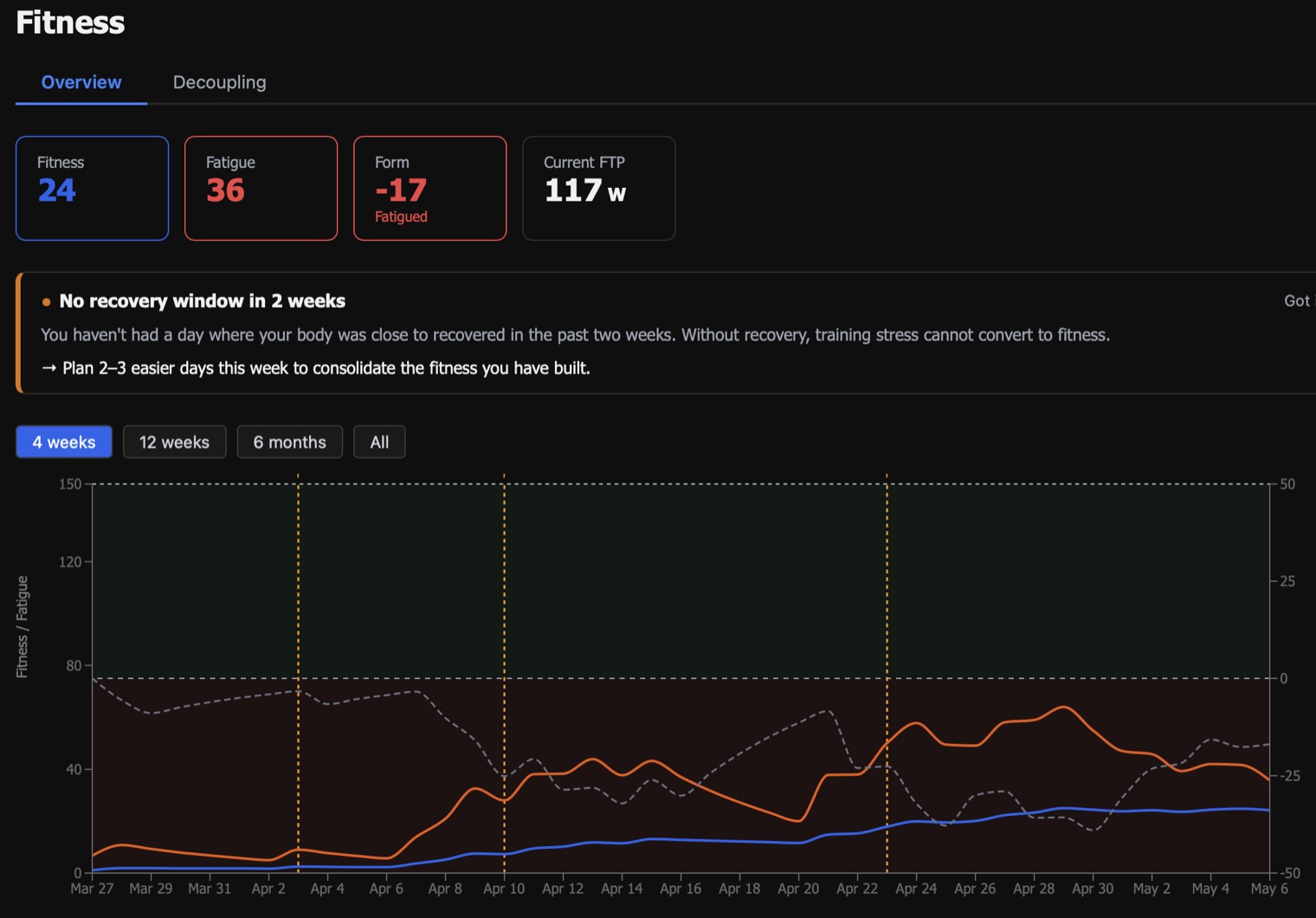
After each ride you get the training load (TSS), the weighted average power and time in zones. From your rides WattLog.pro builds the fitness chart, the PMC: fitness from 6 weeks, fatigue from the last week and the difference between them. If you don't let yourself recover for two weeks, the app tells you. It's on this chart that I watched my FTP go from 178 to 193 W in one training block.
It runs wherever your trainer is
WattLog.pro runs on Mac, iPhone, iPad and Android. On a Windows, Linux or ChromeOS computer you open it in Chrome or Edge and connect to the trainer over Bluetooth, without installing anything. On a Mac the app can sit in the menu bar: power, heart rate and cadence stay at the top of the screen while you watch a film. Not ready to create an account? Start as a guest. It works with any Bluetooth Smart trainer, including Wahoo KICKR, Tacx NEO, Elite Suito and Saris H3. The full list is on the compatible trainers page.
In your language, built by a rider
The whole app is available in eight languages, English included, down to the metric explanations and the messages during a workout. A bug report or a feature idea goes straight to me, and many of the current features started as requests from riders.
What you won't find in WattLog.pro: a 3D virtual world, avatars, group rides or online racing. If those are what keep you on the trainer, WattLog.pro won't replace Zwift or MyWhoosh. It can run alongside them, though: rides from Strava land in your history, and the fitness chart counts everything you've ridden.
Zwift
Price: €19.99 a month or €199.99 a year. Platforms: Windows, macOS, iOS, Android, Apple TV.
The best-known trainer app and the biggest community. You ride an avatar through virtual worlds, mainly Watopia, and there are other riders around you at any hour. On top of that: organised group rides, RoboPacers that ride at a steady pace, racing leagues and a workout library with plans. A good choice if competition and company motivate you. The downsides: the price, and not much analysis after the ride. Zwift shows you a single ride, not how your fitness changes across a season. More on that in the article when Zwift alone isn't enough. If you go with Zwift, start with the guide on how to connect Zwift to your trainer.
MyWhoosh
Price: €0, only add-ons are paid. Platforms: Windows, macOS, iOS, Android, Apple TV.
The free alternative to Zwift: 3D virtual worlds, many modelled on real regions, races with prize money, group rides and a workout builder. If you want a virtual world and don't want to pay for it, MyWhoosh is the best option. You can't upload your own GPX route, though, and there's little analysis of your fitness over time. It pairs well with WattLog.pro: group rides in MyWhoosh, plan and analysis in WattLog.pro.
ROUVY
Price: €19.99 a month or €179.99 a year, with plans for two people and groups too. Platforms: Windows, macOS, iOS, Android, Apple TV.
Instead of computer graphics you get video footage of real roads, more than two thousand routes from around the world, with other riders' avatars overlaid. The feeling of riding "outside" is strongest here. ROUVY also lets you upload your own GPX route, but without video. The trial lasts 7 days and requires a card. Without a subscription you can ride only 20 km a month.
TrainerRoad
Price: $21.99 a month or $209.99 a year. Platforms: Windows, macOS, iOS, Android.
An app for riders preparing for specific events. Plan Builder builds a plan around your race date and available time, and an algorithm picks the next workouts and estimates your FTP from the rides you've done. On screen you only see the workout graph, no world and no video. The plans are demanding, with a lot of intervals. It's the most expensive option in this comparison and has no trial, only a 30-day refund window. If you don't need an automatic race plan, you can do similar ERG training in WattLog.pro without a subscription.
Other apps worth a look
- Wahoo SYSTM ($17.99 a month): workouts with films and storylines, the 4DP test, plus yoga and strength training.
- TrainingPeaks Virtual (part of TrainingPeaks Premium, $19.95 a month): a virtual world tied to the TrainingPeaks calendar. Good if your coach already writes your workouts in TrainingPeaks.
- Kinomap and FulGaz: video footage of real routes, like ROUVY, at a lower price.
- Intervals.icu: free training analysis in the browser. It doesn't control a trainer, so you need a separate app to ride.
How to choose a smart trainer app: 5 questions
- What motivates you? A world and other riders: Zwift or MyWhoosh. Real roads: ROUVY. A plan and numbers: WattLog.pro or TrainerRoad.
- How much do you want to pay every year? €0: WattLog.pro and MyWhoosh. €115 to €200: the rest.
- What will you ride with? Only a Windows computer and you don't want to install anything? WattLog.pro runs in Chrome. A TV with Apple TV? Zwift, MyWhoosh or ROUVY.
- Do you want to ride your own routes? You can ride a GPX file in WattLog.pro and in ROUVY.
- Do you want to know whether your training works? You need a fitness chart, FTP history and a power curve. WattLog.pro has them in the basic version, for free.
You don't have to pick just one. The most common combination is a free world for riding for fun and WattLog.pro for structured training and analysis. If you're just starting out, also read how to start training on a trainer and do a Ramp Test so your power zones fit you from the first workout.
The simplest start: open app.wattlog.pro in Chrome, choose "Continue as guest", connect your trainer and pick a workout from the library. Five minutes, no install, no card, no account.
Train without a subscription
WattLog.pro runs in Chrome, on Mac, iPhone and Android. ERG workouts, plans, GPX routes and fitness analysis for €0, no card needed.
Try WattLog.pro for free →