Virtual gears in WattLog.pro: Zwift Click V2 without Zwift, other shifters over OpenBikeControl
WattLog.pro has virtual gears. In Free Ride and on routes you shift with your shifters and the trainer behaves as if you moved the chain: a higher gear means more resistance at the same cadence. A Zwift Click V2 works with no extra app, and other shifters connect over the open OpenBikeControl protocol. I tested it on a Wahoo KICKR CORE with a Zwift Cog, a single fixed cog.
How it works
A smart trainer in simulation mode takes a road grade from the app. It knows nothing about gears. So WattLog.pro works out which grade to send so that riding at flywheel speed v in a gear k times bigger feels like riding at k·v on that road:
trainer grade = k · road grade + (k − 1) · Crr + CdA · v² · (k³ − 1) / (m · g)
In the neutral gear k = 1 and the trainer gets exactly the route's grade, as without gears. A higher gear sends a steeper climb, a lower one a gentler one. Speed and distance in the ride file grow with the gear, so a higher gear also means a faster ride along the route. The formula uses your weight from your profile plus 9 kg for the bike, the same mass WattLog.pro uses for speed when you ride a GPX route on the trainer.
What you can connect
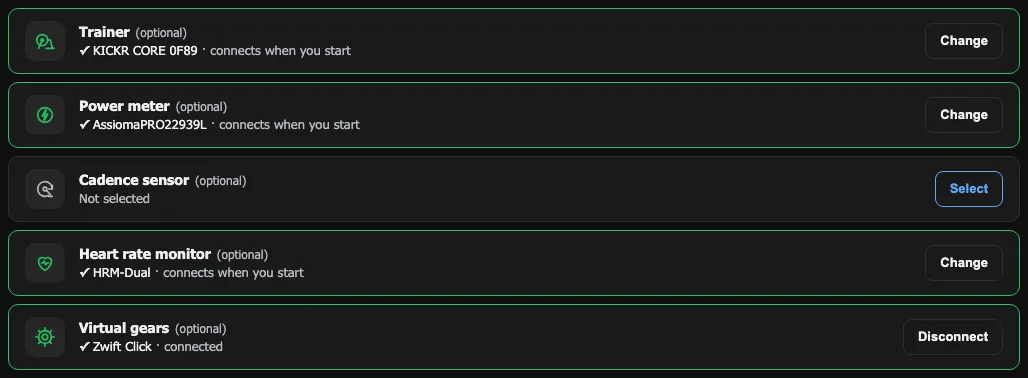
- Zwift Click V2, directly. No Zwift and no other app: you pick it in Chrome or Edge. Connect the left pod, because it also relays the right pod's buttons. “+” shifts up, “−” shifts down.
- Shifters over OpenBikeControl. It is an open, free protocol for controllers. Through BikeControl (a separate paid app by another developer) you can connect Zwift Play and Ride, Shimano Di2 or SRAM AXS. Hardware with OpenBikeControl built in, like the Stages SB200, connects without it.
- Keyboard or a remote. By default + / − and Page Up / Page Down shift. Those last two are what a Bluetooth page-turner or presenter remote sends, so one strapped to the bar works as a shifter for a few euros. You can set your own keys.
Your buttons and your cassette
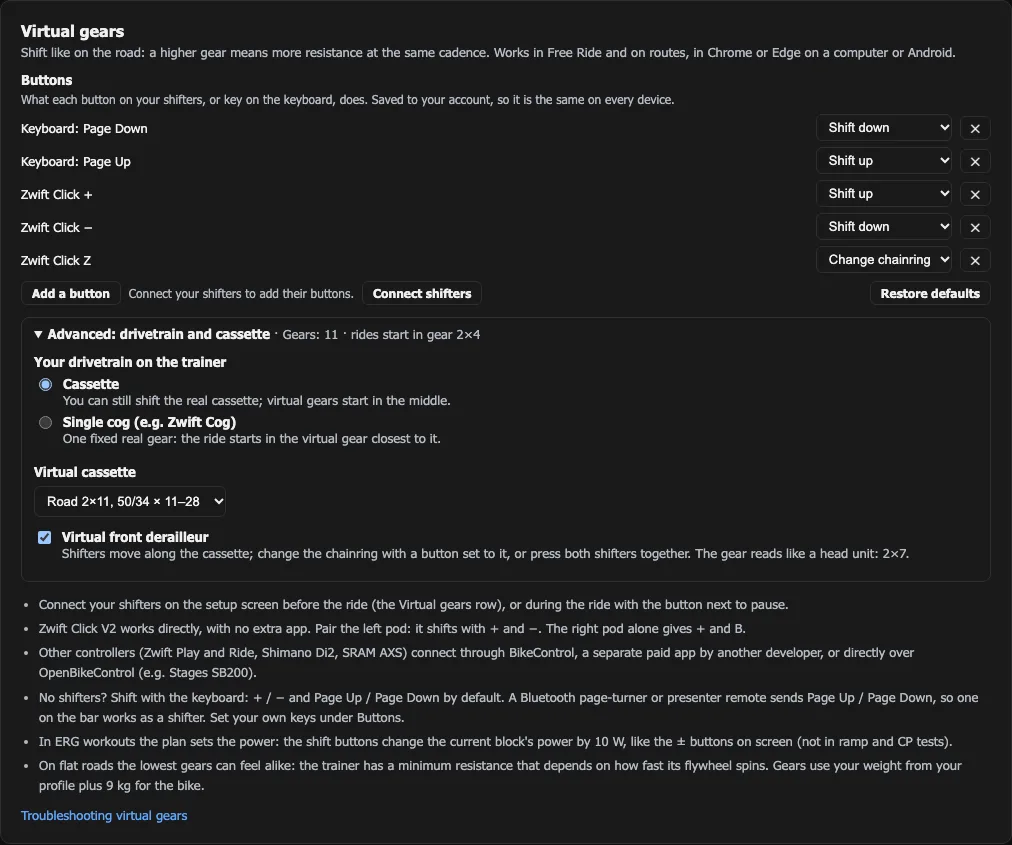
In Settings → Virtual gears the buttons come first. Press “Add a button”, then the button on your shifters or a key, and pick what it does: shift up, shift down or change chainring. The mapping is saved to your account, so it is the same on every device.
Below, in a folded “Advanced” section, is the rest. Most riders never need it: the default 24 gears are a sensible middle, as in Zwift.
- Your drivetrain on the trainer. A cassette, if you can still shift the real derailleur, or a single cog like the Zwift Cog: then you enter the chainring and cog teeth, and the ride starts in the virtual gear closest to that ratio.
- A virtual cassette. The default 24 gears about 9% apart, road 2×11 (50/34 × 11–28), road 2×12 (52/36 × 11–30) or gravel 1×12 (40 × 10–45).
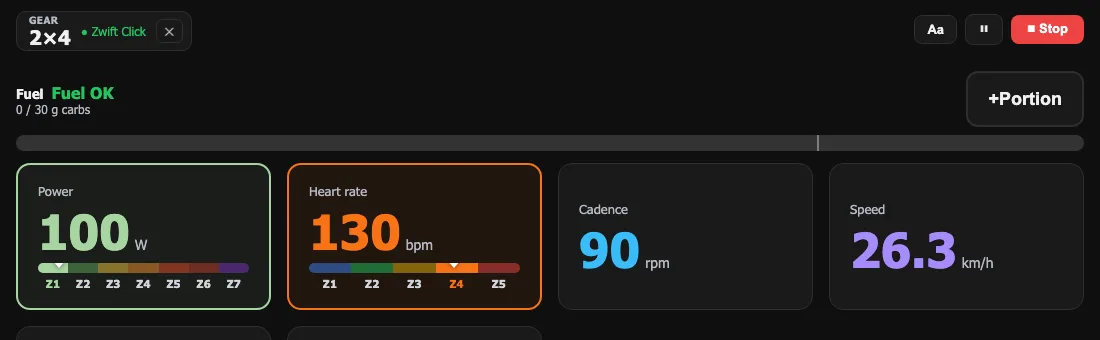
- A virtual front derailleur for 2× cassettes. The shifters step along the cassette, and you change the chainring with a button set to it or by pressing both shifters together, as on SRAM AXS.
In an ERG workout
In ERG the plan sets the power, so gears make no sense there. Instead, the shift buttons and keys change the current block's power by 10 W, just like the ± buttons on screen. Three quick presses are +30 W; none get lost. In the ramp test and the CP test the buttons do nothing, because those protocols are fixed. More on how ERG holds the power in the power match article.
What the first rides taught me
I did the first two rides with the Click on a KICKR CORE with a Zwift Cog: a Free Ride and a flat route (the Hel Peninsula in Poland). At 82–93 rpm this is what came out:
| Gear (of 24) | Grade sent to the trainer | Power from the pedals |
|---|---|---|
| 1 | −1.5% | 94 W |
| 5 | −1.4% | 90 W |
| 9 | −0.8% | 80 W |
| 12 (neutral) | 0% | 86 W |
| 16 | +2.8% | 171 W |
Shifting up works as it should. On flat roads, though, the lowest gears give almost the same power, about 80–95 W. That is not a maths error but trainer physics: a flywheel spun at 28 km/h has a minimum resistance the trainer will not go below, even when it is sent a descent. With a single fixed cog you cannot lower it with the real derailleur either. On a climb the low gears do make a difference, turning 5% into a gentle 1–2%.
The Zwift Click and its locked left pod. Some Clicks keep the left pod working only after the Zwift app has unlocked them that day. Mine (firmware 1.2.0, never paired with Zwift) kept the left pod working for the whole ride. If yours stops answering after a minute, connect the right pod: “+” shifts up, “B” shifts down. WattLog.pro does not work around Zwift's protection and will not.
Which shifters work, and what I tested
The Zwift Click shows up most in this article because it is the only shifter I have ridden on my own hardware. Everything else works over the open OpenBikeControl protocol: the code is done and tested on a simulator, but not yet on real hardware. Honestly, it stands like this:
| Shifters | How they connect | Tested |
|---|---|---|
| Zwift Click V2 | directly, Bluetooth in the browser | yes, on a KICKR CORE with a Zwift Cog |
| Zwift Play, Zwift Ride | through BikeControl (OpenBikeControl) | waiting for a test with BikeControl |
| Shimano Di2, SRAM AXS | through BikeControl (OpenBikeControl) | waiting for a test with BikeControl |
| Stages SB200 | directly, OpenBikeControl built in | no, I do not have one |
| Keyboard | always, no pairing | yes |
| Page-turner remote | as a keyboard (Page Up / Page Down) | not yet |
Through BikeControl, a front shift on a Di2 or AXS lever does not reach the app for now: OpenBikeControl only carries shift up and shift down, so the gears step one by one. If you have one of these shifters and would like to help test, get in touch. I will update the table after each check.
Limits worth knowing
- For now it works in Chrome or Edge on a computer or Android. The mobile and desktop apps get gears later.
- A Zwift Click takes one connection: close Zwift or BikeControl before you connect it to WattLog.pro, or connect it to BikeControl and WattLog.pro to BikeControl.
- A page reload sends the ride back to the start gear.
Virtual gears in WattLog.pro are free, like the whole app, including with a Zwift Click connected directly. The only thing you pay for is BikeControl, a separate app by another developer, and only if you want to connect other shifters through it.
Train smarter with WattLog.pro
WattLog.pro collects data from your trainer and shows what's really happening with your fitness.
Try WattLog.pro for free →